Category: Free VST Plugins & Software

  • Parish Audio Releases Stereo Control Plugin – Free for a Limited Time

    Parish Audio Releases Stereo Control Plugin – Free for a Limited Time

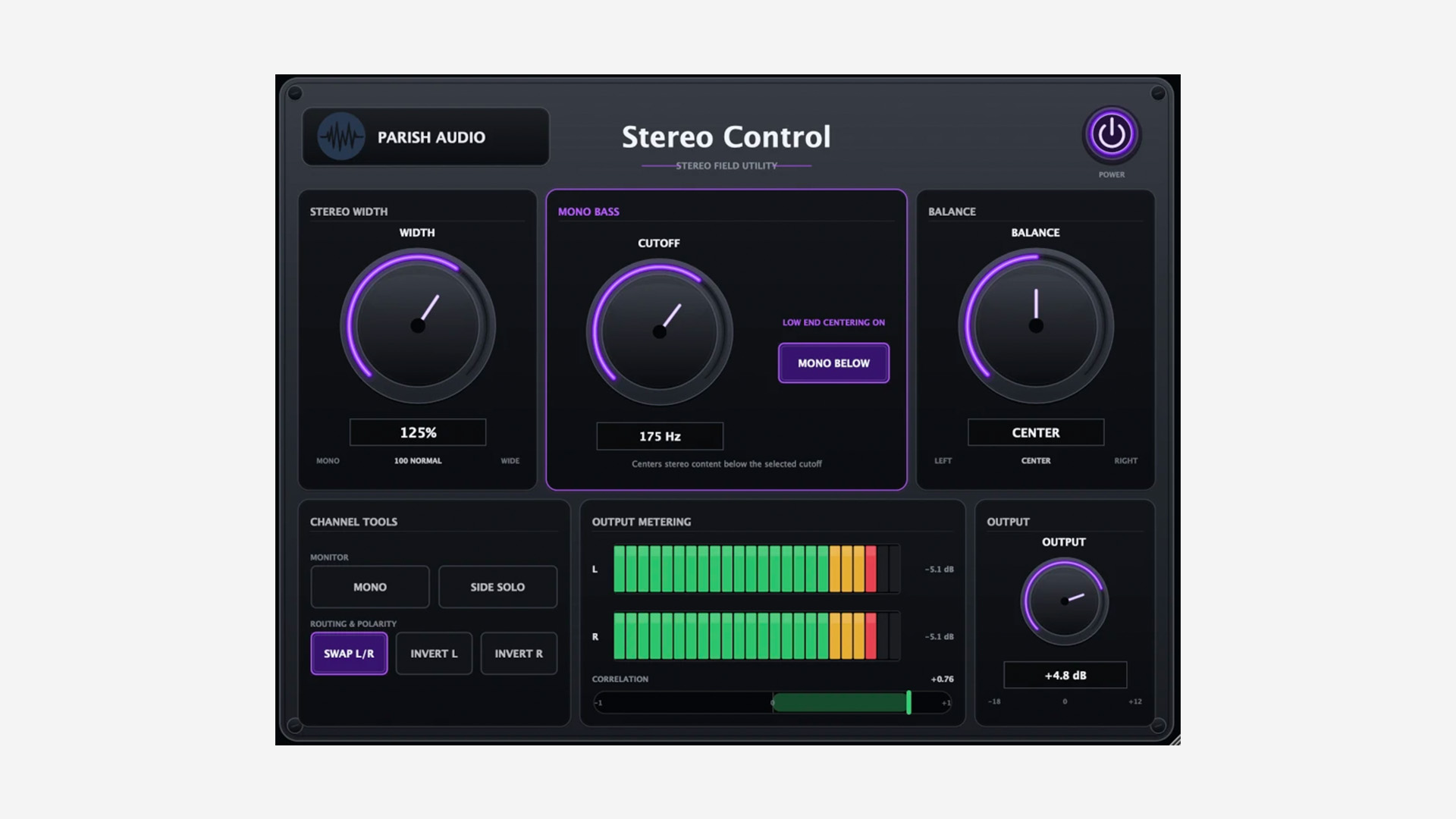
    Parish Audio has released Stereo Control, a stereo imaging and utility plugin for Windows and macOS – currently available as a free download for a limited time.

    A Simple Stereo Utility for Everyday Mixing

    Stereo Control brings several useful stereo tools into one compact plugin. The Width control runs from full mono up to 200%, so you can tighten an overly wide signal or push it further out into the stereo field.

    There is also a Mono Bass section that centers frequencies below an adjustable cutoff while leaving the upper part of the signal in stereo. This can be useful on synths, loops, reverbs, or even the master bus when the low end needs a bit more focus.

    Useful Monitoring Tools Built In

    The plugin also includes several handy monitoring options. You can switch the signal to mono, solo the Side information, swap the left and right channels, and invert the polarity of either channel independently.

    Side Solo is especially useful when checking what actually lives outside the center of a mix. Combined with the stereo correlation meter, it gives you a quick way to catch width and phase issues before they become a problem.

    Simple and Practical

    Parish Audio has kept the interface straightforward. Alongside the imaging and monitoring controls, you also get balance, output gain, left/right level meters, a stereo correlation meter, and a resizable interface.

    It looks like the kind of utility plugin that can quietly live on tracks, groups, stereo effects, or the master bus without getting in the way.

    Features

    • Stereo width control from mono to 200%
    • Adjustable Mono Bass section
    • Balance control
    • Mono monitoring
    • Side Solo
    • Left/right channel swap
    • Independent left and right polarity inversion
    • Output gain
    • Left/right output meters
    • Stereo correlation meter
    • Resizable interface

    Plugin Formats

    Stereo Control is available in VST3 format for Windows, and in VST3 and AU formats for macOS.

    Free Download

    Stereo Control is available as a free download for a limited time from the Parish Audio website.
  • SoundBetter Offers Vocal Effect Plugin Free for a Limited Time

    SoundBetter Offers Vocal Effect Plugin Free for a Limited Time

    SoundBetter is offering Vocal Effect plugin as a free download for a limited time. The plugin is usually priced at $79, so this looks like one of those straightforward grab-it-now deals if the concept appeals to you.

    A Vocal Processor Built Around a Mixing Chain

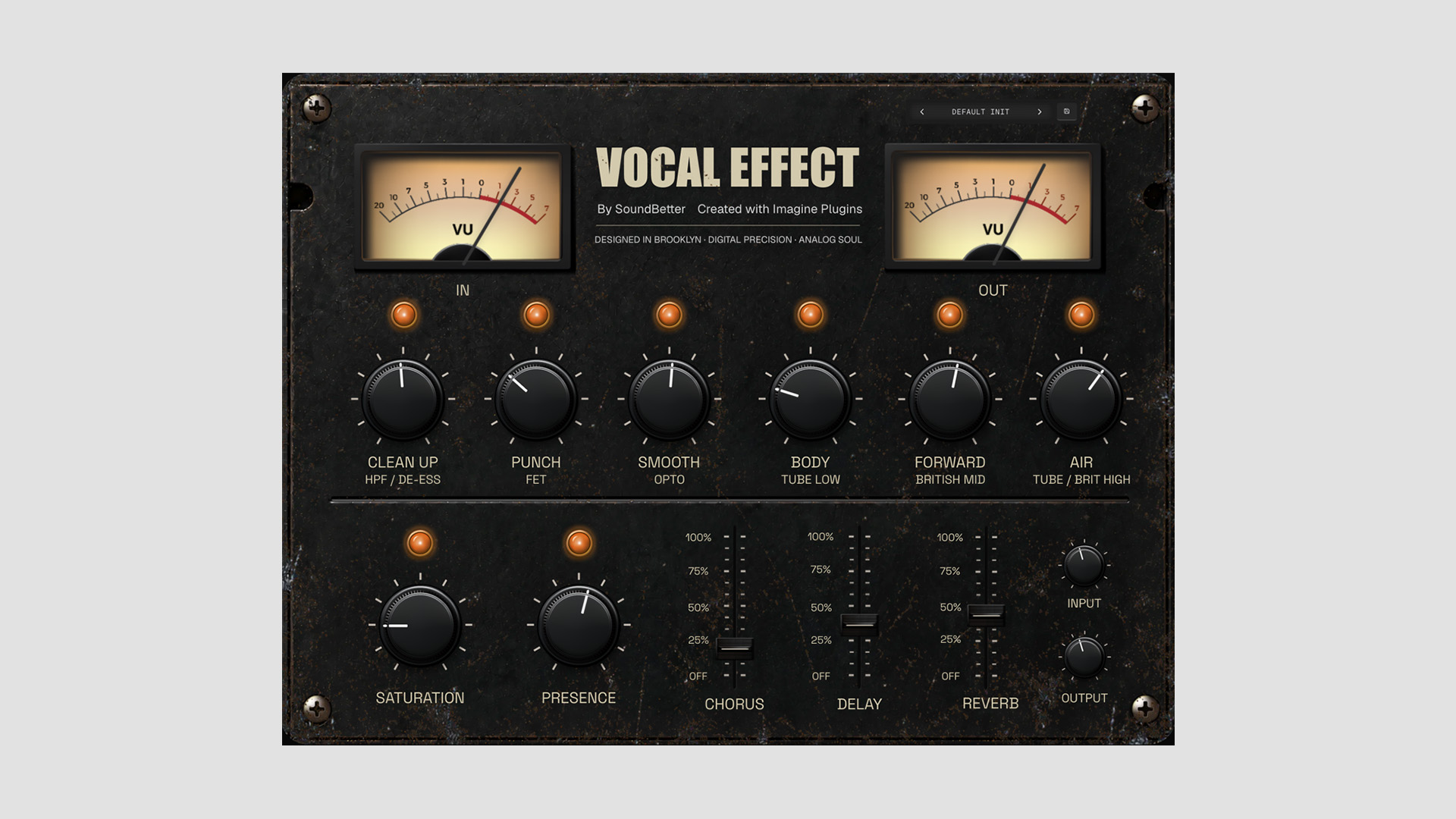
    Vocal Effect is presented as a vocal-focused plugin built around a mixing engineer’s signature chain. According to the description, it uses analog-modeled DSP and aims to combine several common vocal treatment stages into one interface.

    The plugin covers a fairly broad range of shaping tools. These include Clean Up for HPF and de-essing, Punch for FET-style processing, Smooth for opto-style control, Body for low tube tone, Forward for British-style mid emphasis, and Air for brighter top-end shaping.

    More Than Basic EQ and Compression

    The lower section adds Saturation and Presence controls, along with built-in Chorus, Delay, and Reverb. That gives Vocal Effect more of a full vocal-strip feel than a simple enhancer plugin.

    In other words, it looks designed for users who want to move quickly and get a polished vocal sound without building a longer chain from separate plugins. That kind of workflow can be especially useful for demos, quick mixes, or anyone who prefers broader musical controls over deeper technical tweaking.

    Built With Imagine Plugins

    Another point of interest here is that Vocal Effect was created entirely in Imagine Plugins, a visual no-code environment for building plugins (browser-based). So alongside the free offer itself, this release also works as a small showcase for what the platform can do.

    Features

    • Free for a limited time
    • Usually priced at $79
    • Vocal processing plugin with analog-modeled DSP
    • Built around a mixing engineer’s signature chain
    • Clean Up, Punch, Smooth, Body, Forward, and Air controls
    • Additional Saturation and Presence controls
    • Built-in Chorus, Delay, and Reverb
    • Created in the Imagine Plugins no-code environment
    • Available for macOS and Windows

    Plugin Formats

    Vocal Effect is available in VST3, AU, and AAX formats for macOS and Windows.

    Free Download

    Vocal Effect plugin is available as a free download for a limited time from the SoundBetter website.

  • JB Project Studio Releases Auralizer Free Spatial Plugin

    JB Project Studio Releases Auralizer Free Spatial Plugin

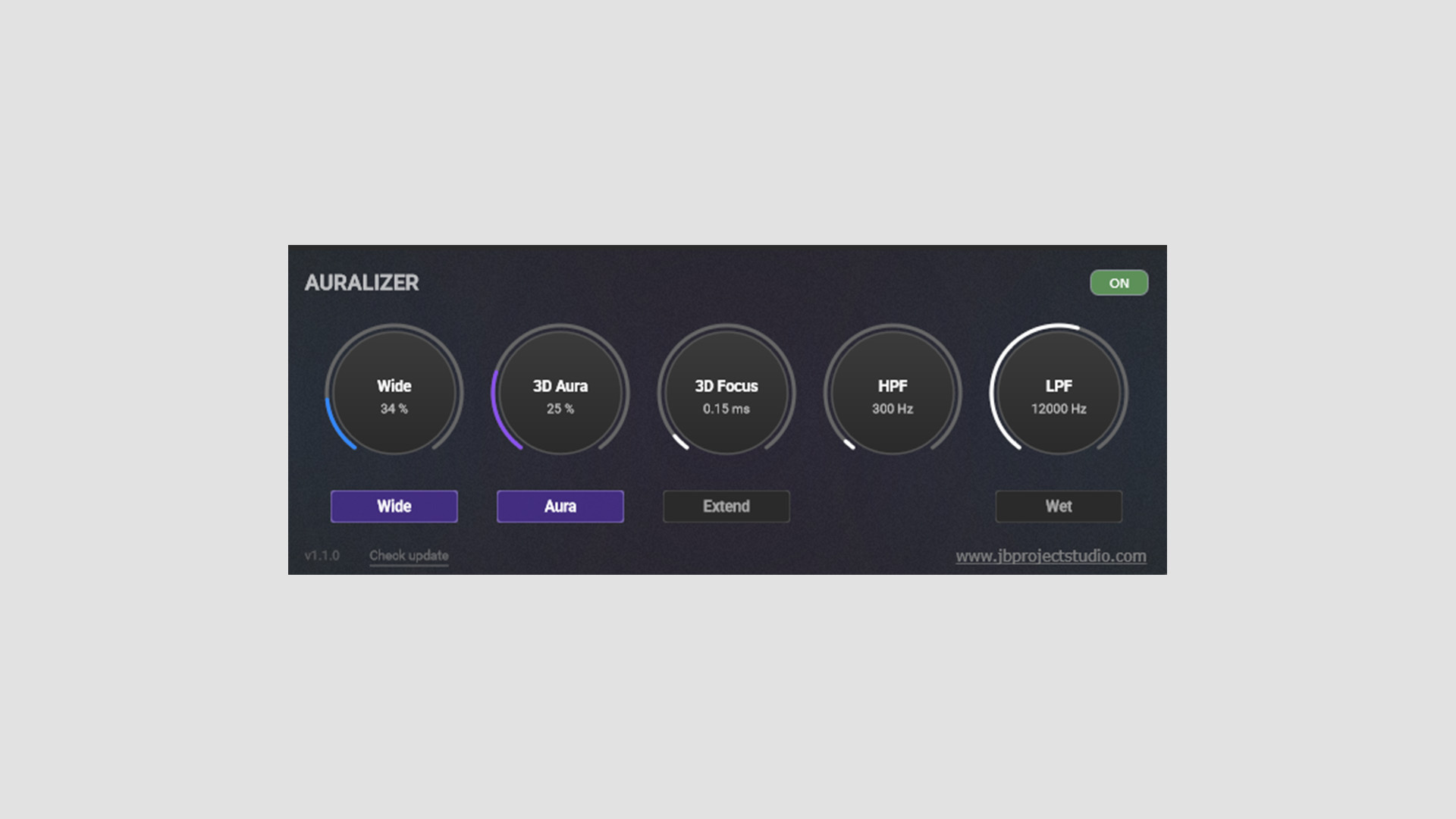
    JB Project Studio has released Auralizer, a free spatial audio plugin built to enhance the sense of three-dimensional space in a mix. The plugin uses a Hilbert Transform-based approach to widen and shape the stereo image while preserving mono compatibility.

    A Stereo Tool Focused on Width and Depth

    Auralizer is aimed at mastering, mix bus, subgroup, and individual track use. So this is not just another quick stereo widener with one oversized knob and a vague promise of “bigger sound.” It is clearly trying to do something more deliberate.

    The heart of the plugin is the 3D Aura section. This is where the main widening process happens, using phase rotation and FIR filtering to feed part of the Mid signal into the Side signal. In use, that should put Auralizer closer to a specialized spatial tool than a standard width enhancer.

    Wide, Aura, and Focus Controls

    The Wide control has its own On/Off switch and operates independently of 3D Aura. Instead of handling the more advanced spatial processing, it simply boosts the Side signal level.

    3D Focus works alongside 3D Aura and adds delay to the processed signal. There are two modes here. Standard mode runs from 0 to 3 ms for more precise mastering-style adjustments, while Extend mode goes up to 15 ms for more obvious widening and creative effects on synths, guitars, and other instruments.

    Filters and Wet Monitoring

    Auralizer also includes high-pass and low-pass filters, so you can define where the processing takes effect. JB Project Studio keeps the high-pass filter above 250 Hz, which makes sense for this kind of plugin since widening the very low end usually creates more problems than it solves.

    There is also a Wet control for soloing the processed signal or setting up parallel use. The plugin includes visual feedback, too, although the developer is right to suggest using your ears first.

    A Useful Tool if You Treat It With Care

    Auralizer looks most useful as a more controlled alternative to a simple stereo widener. It should be handy for mix bus work, subgroup processing, or individual tracks that need a bit more space without falling apart in mono.

    At the same time, JB Project Studio makes a fair point about critical listening. As with most width tools, subtle settings will usually get you further than heavy-handed ones.

    Features

    • Free spatial audio plugin
    • Designed to enhance three-dimensional width and depth
    • Hilbert Transform-based 3D Aura processing
    • Wide control for boosting Side signal level
    • 3D Focus delay control with Standard and Extend modes
    • High-pass and low-pass filters for defining the processing range
    • Wet control for processed-signal soloing or parallel use
    • Intended for mastering, mix buses, subgroups, and individual tracks
    • Visual feedback for monitoring the effect

    Plugin Overview

    Auralizer is a more technical spatial tool than the average stereo widener, but the concept is still easy enough to grasp after a minute with the controls. For anyone who likes to fine-tune width rather than just pushing a single knob and hoping for the best, it looks like a useful free option.

    Free Download

    Auralizer spatial plugin is available as a free download from the JB Project Studio GitHub.

  • DAWJunkie Releases Mini-Menace Free Synthesizer Plugin

    DAWJunkie Releases Mini-Menace Free Synthesizer Plugin

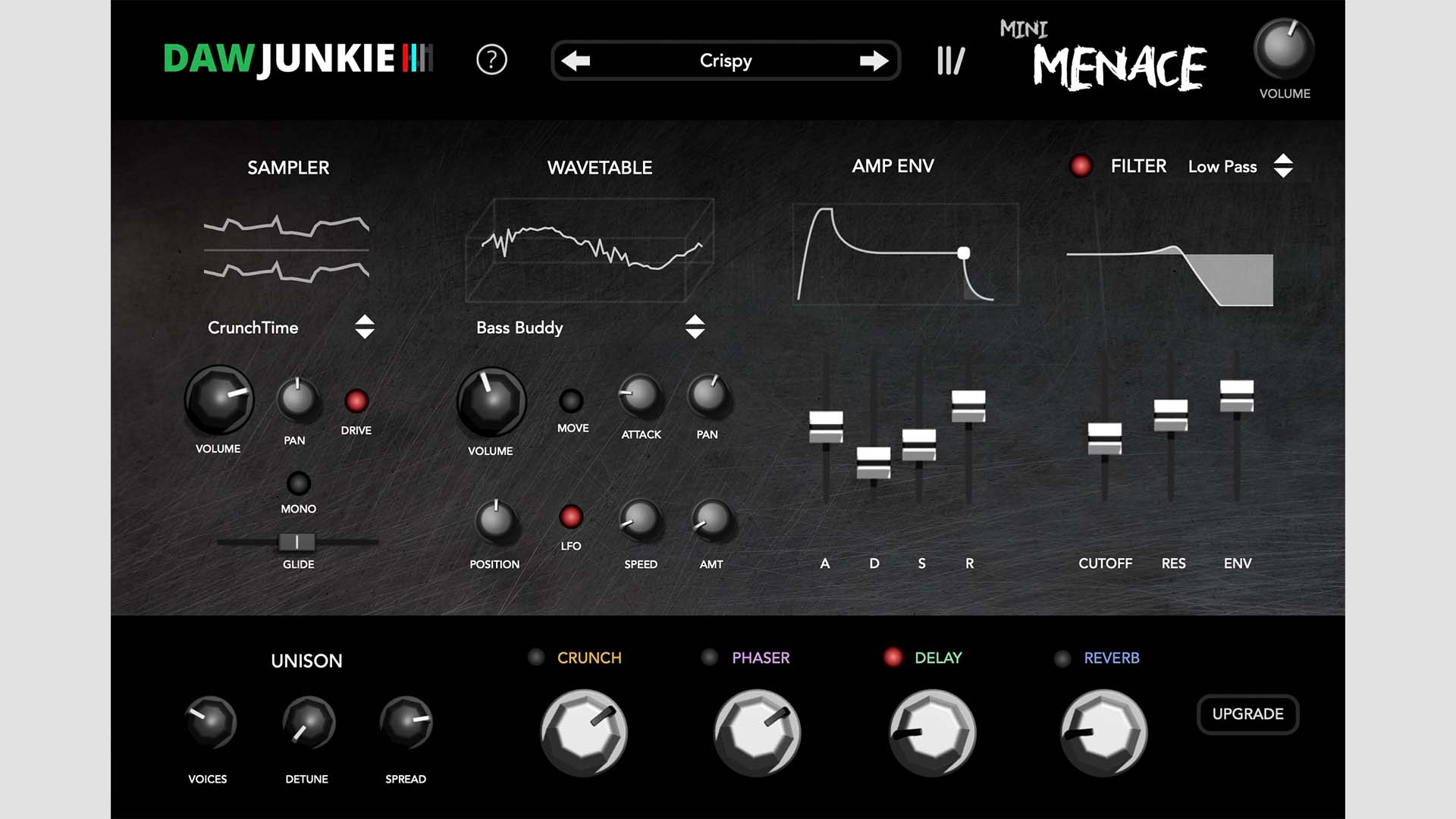
    DAWJunkie has released Mini-Menace, a free synthesizer plugin for macOS and Windows. The instrument is available in AU, VST, and AAX formats, and all of its sounds are sourced from the fully analog Arturia MicroBrute.

    A Compact Synth Built From Analog Source Material

    Mini-Menace appears to be aimed at users who want quick access to aggressive, characterful synth tones without having to deal with a more complex interface. Based on the available details, the plugin combines sampled analog source material with wavetable-style shaping, envelopes, filtering, and built-in effects.

    That setup gives it a more hybrid feel than a basic rompler. It also suggests that DAWJunkie wanted to keep the workflow simple while still giving users enough controls to shape the sound in useful ways.

    Sampler and Wavetable Sections

    The Sampler section includes three sound variations: CrunchTime, Interrupter, and RoundSound. Alongside that, the Wavetable section offers five variations: Dracula, Mini Crunch, Warmer, Bass Buddy, and Whiner.

    Users can adjust the wavetable position directly, and movement can also be added through the Motion switch or an LFO. Based on the available information, these two sections seem to form the core of the sound before further shaping is applied.

    Filter, Envelope, and Built-In Effects

    Mini-Menace also includes an amp envelope and a low-pass filter for more detailed control over the tone and response. In addition, the plugin includes a built-in effects section with Crunch, Phaser, Delay, Reverb, and Unison.

    Taken together, these controls should enable a smooth transition from straightforward synth sounds to more processed and animated textures. The overall layout shown in the interface also looks fairly immediate, which is usually a good sign for a free instrument like this.

    Features

    • Free synthesizer plugin from DAWJunkie
    • All sounds sourced from the analog Arturia MicroBrute
    • Sampler section with CrunchTime, Interrupter, and RoundSound variations
    • Wavetable section with five variations
    • Adjustable wavetable position
    • Motion switch and LFO movement options
    • Amp envelope and low-pass filter
    • Built-in Crunch, Phaser, Delay, Reverb, and Unison effects
    • Available for macOS and Windows

    Plugin Formats

    Mini-Menace is available in AU, VST, and AAX formats for macOS and Windows.

    Free Download

    Mini-Menace synthesizer plugin is available as a free download from DAWJunkie.

  • Hyperfocus DSP Releases Niner Free Kick Drum Synth Plugin

    Hyperfocus DSP Releases Niner Free Kick Drum Synth Plugin

    Hyperfocus DSP has released Niner, a free and open-source kick drum synthesizer plugin for Linux, macOS, and Windows. The plugin is currently in beta and is available in VST3, CLAP, and standalone formats.

    A Focused Drum Synth Built Around Kicks and Clap Layers

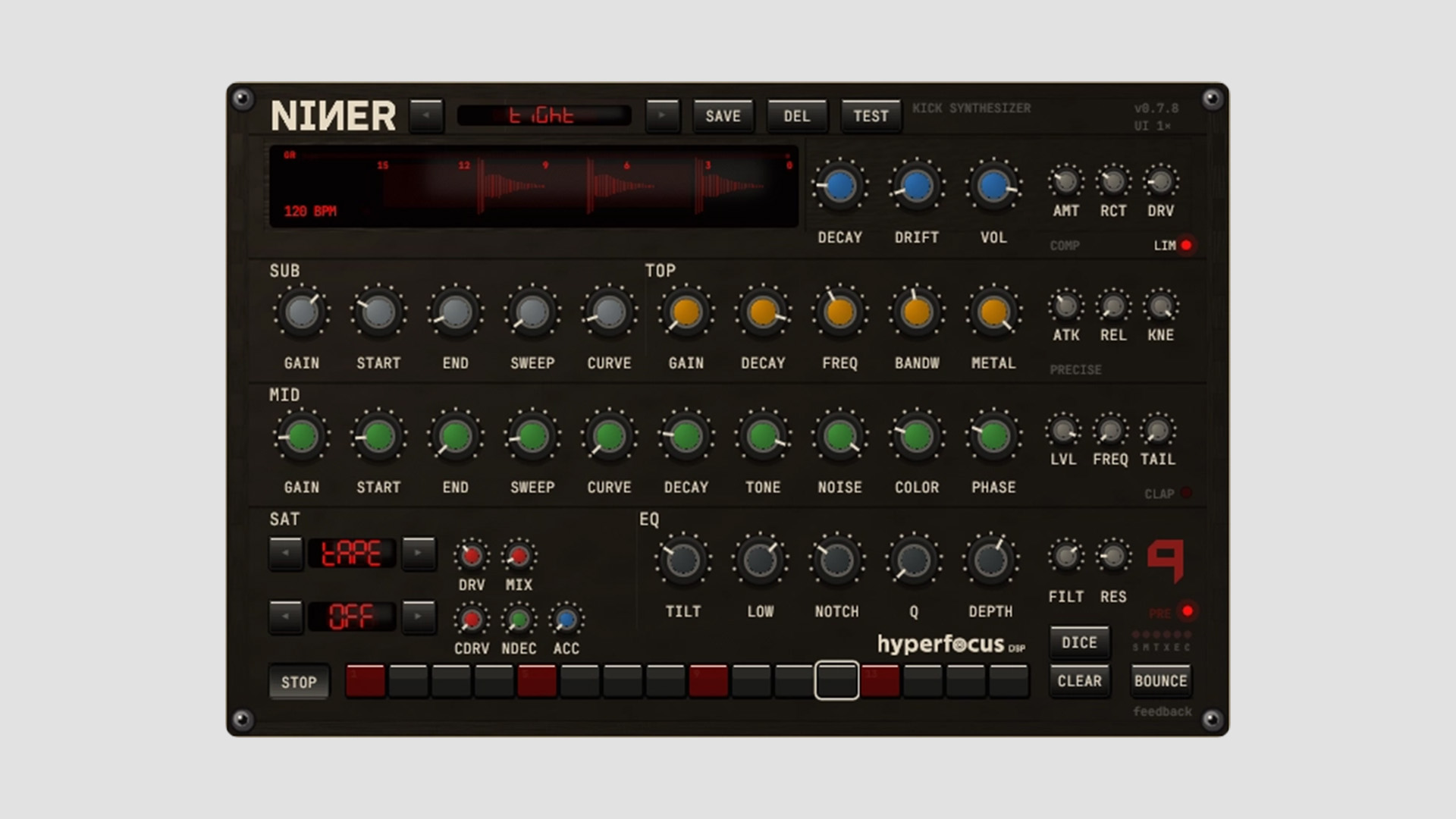
    Niner is designed as a dedicated kick drum synthesizer rather than a general drum machine. It uses a three-layer engine built from SUB, MID, and TOP sections, which gives users separate control over the low-end body, the midrange weight, and the transient click.

    Alongside the kick engine, Hyperfocus DSP also includes a parallel 909-style clap voice. That makes the plugin a bit more flexible than its main label suggests, especially for producers who want quick drum design tools in one place.

    Three Layers, Distortion Stages, and Master Processing

    The core of Niner combines a SUB sine layer with pitch envelope control, a MID sine-plus-noise layer, and a TOP band-passed click layer. Each one includes its own tuning, amplitude, pitch envelope, and drift settings.

    From there, the signal runs into a fairly deep processing chain. Niner includes per-voice clip shaping, a five-mode distortion palette, master EQ, compressor, transformer drive, brickwall limiting, and automatic tube warmth. On paper, that may sound like a lot, but it is actually one of the more interesting parts of the plugin because it gives users control over both clean punch and a more aggressive character.

    Sequencer, Bounce, and Preset Tools

    Niner also includes a 16-step sequencer that syncs to the host in a DAW and uses internal transport in standalone mode. In addition, users can render one-shot sounds directly from the plugin as 16-bit, 44.1 kHz WAV or AIFF files.

    The plugin supports both factory and user presets, and Hyperfocus DSP says preset handling is designed to remain forward-compatible. That is a practical touch, especially for a project that is still in beta.

    Formerly Slammer

    One detail worth noting is that Niner was previously released under the name Slammer. According to Hyperfocus DSP, the plugin was renamed in version 0.7.0 because of a trademark conflict. Plugin IDs also changed, which means older DAW projects using the Slammer version will need to be re-wired, although user presets and settings should migrate automatically on first launch.

    Features

    • Free and open-source kick drum synthesizer
    • Three-layer kick engine with SUB, MID, and TOP sections
    • Parallel 909-style clap voice
    • Per-layer tuning, drift, amp envelope, and pitch envelope controls
    • Per-voice clip shaping with Tanh, Diode, and Cubic modes
    • Master saturation, transformer drive, compression, EQ, limiter, and tube warmth
    • 16-step sequencer with DAW sync
    • One-shot bounce to WAV or AIFF
    • Factory and user presets
    • Available as VST3, CLAP, and standalone
    • Beta release with GPL-3.0 license

    Plugin Formats

    Niner is available in VST3, CLAP, and standalone formats for Linux, macOS, and Windows. It supports both Apple Silicon and Intel Macs. AU is not supported, so Logic Pro users cannot load it at this time.

    Free Download

    Niner is available as a free download from Hyperfocus DSP.

  • Cure Audio Releases Scream Free Filter Plugin Inspired by Massive’s Module

    Cure Audio Releases Scream Free Filter Plugin Inspired by Massive’s Module

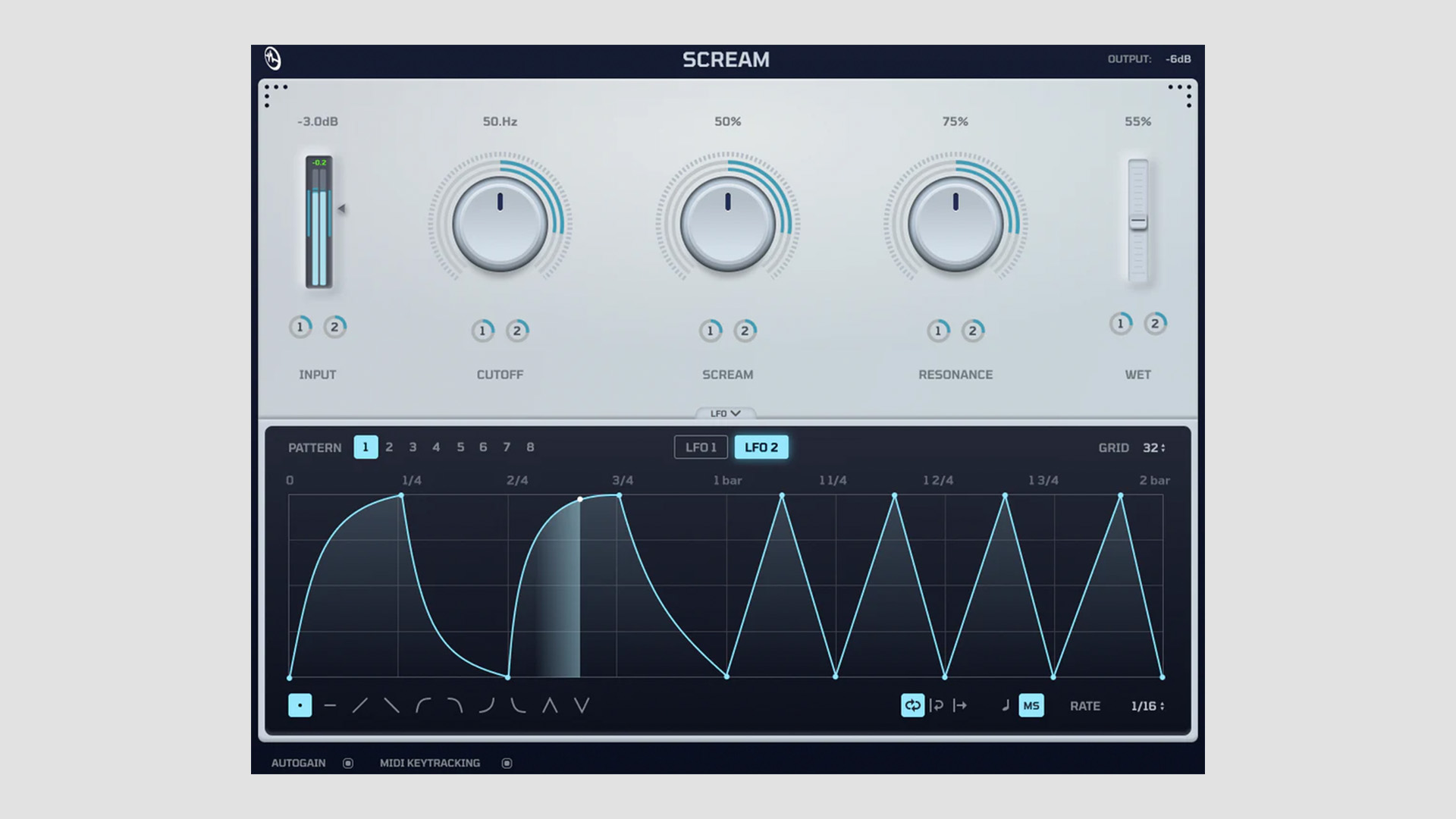
    Cure Audio has released Scream, a free filter plugin designed to recreate the well-known Scream filter from Massive in a standalone effect for modern DAWs. It is positioned as a versatile tool for electronic music production, but it looks broad enough to be useful well beyond that space.

    A Classic Aggressive Filter in Plugin Form

    Scream has the character of the original filter, which became known for its aggressive tone, strong resonance, and edgy sound. That kind of filter has long been a go-to choice for shaping basses, leads, and more intense sound design, so putting it into a separate plugin makes practical sense.

    From the description, Cure Audio seems to be aiming for the same raw energy, while making the effect available across a wider range of hosts and workflows.

    More Than a Bass Filter

    Although this type of filter will naturally appeal to bass-heavy production styles, Cure Audio says Scream can also be used on drums, synths, pads, and vocals. In other words, it is meant to work as a broader color and movement tool rather than a one-purpose effect.

    The plugin can apparently move from subtler saturation into much harsher and more distorted territory – it depends on how hard it is pushed. That gives it a bit more range than the name alone might suggest.

    Built-In Modulation for Faster Workflow

    One of the more useful additions here is the built-in modulation engine. Scream includes both an LFO and a Performer system, so users can draw modulation shapes directly inside the plugin instead of relying on DAW automation for every movement.

    That should make it easier to build sweeps, rhythmic motion, and more animated filter effects without slowing down the workflow.

    Lightweight and Open Source

    Cure Audio also describes Scream as fast, intuitive, and lightweight. There’s no overloaded menu structure or unnecessary complexity. That matters for this kind of effect, since a filter plugin usually works best when it feels quick and immediate.

    Another strong point is that Scream is both free and open source, which will likely make it even more appealing to producers who want a capable creative tool without restrictions.

    Features

    • Free filter plugin from Cure Audio
    • Recreates the Scream filter known from Massive
    • Designed for basses, leads, drums, synths, pads, and vocals
    • Can move from subtle saturation to more aggressive distortion
    • Built-in LFO modulation engine
    • Performer system for drawing custom movement
    • Clean and lightweight interface
    • Open-source release
    • Available across major DAWs

    Plugin Formats

    You can get the plugin in VST3, CLAP, and AUv2 formats for both Windows and macOS.

    Free Download

    Scream filter plugin is available as a free download from Cure Audio.

  • Darkstarz Technologies Releases DustBox Plugin Free for a Limited Time

    Darkstarz Technologies Releases DustBox Plugin Free for a Limited Time

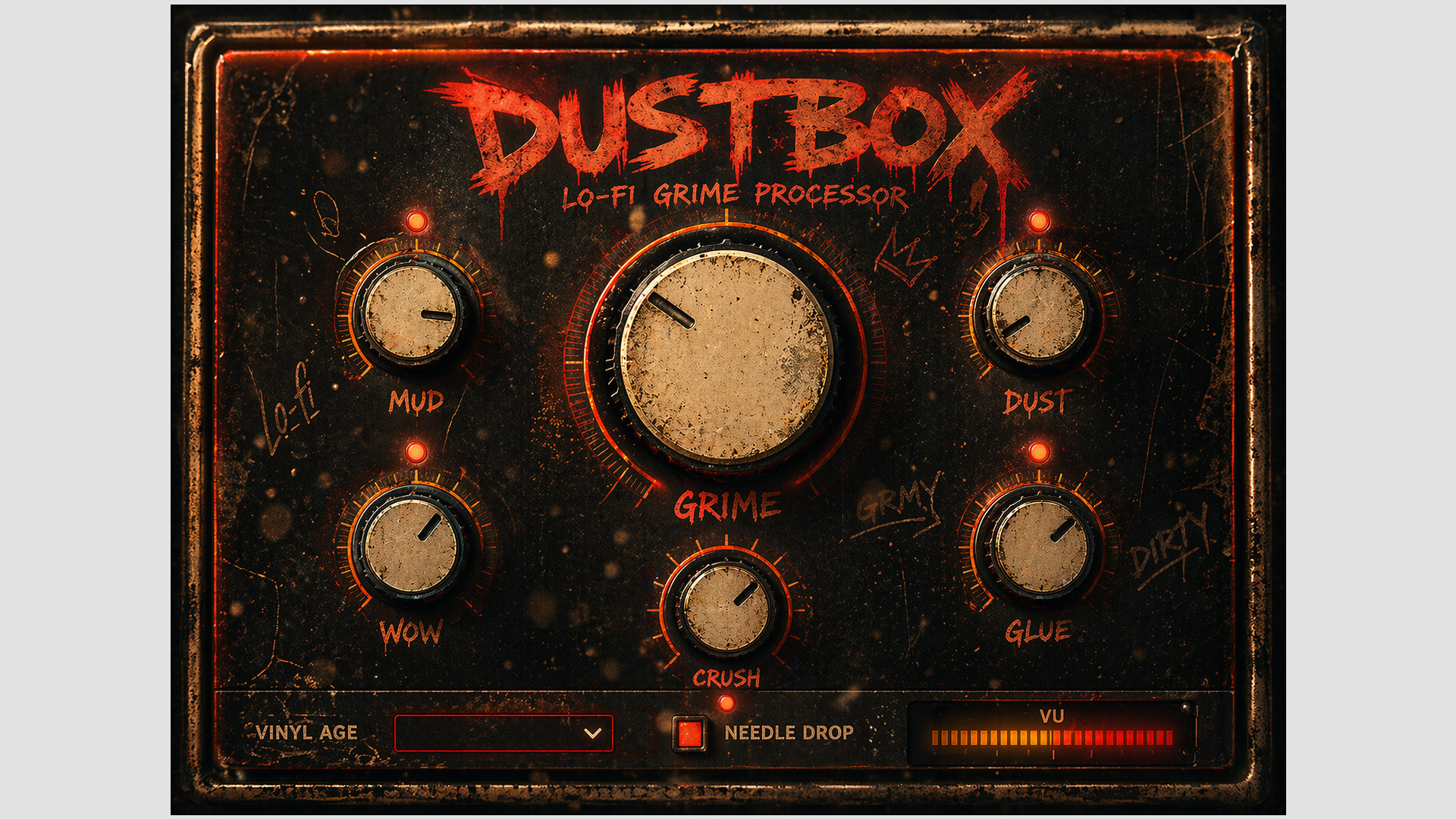
    Darkstarz Technologies presents DustBox as a lo-fi grime processor plugin built for adding raw texture, worn character, and degraded analog-style tone to digital audio. The plugin usually sells for $19.99, but it is currently available as a free download for a limited time. It is clearly aimed at producers who want something dirtier and more emotional than a standard saturation or tape plugin.

    Built for Texture, Dirt, and Movement

    At its core, DustBox focuses on turning clean sounds into something rougher and more lived-in. The concept pulls from dusty vinyl, aging tape machines, degraded samplers, and older analog gear. That gives it a familiar lo-fi angle, but the wording suggests it is designed to go beyond light coloration when needed.

    From subtle warmth to heavier destruction, DustBox appears to cover a fairly wide range. So it could suit producers who just want a bit of motion and grit, as well as those looking for stronger texture and obvious damage.

    Controls Built Around Character

    The main controls include Mud, Dust, Wow, Glue, Crush, and Grime. Together, they suggest a workflow centered on shaping wobble, noise, saturation, and degraded tonal color without overcomplicating the interface.

    There is also a Needle Drop mode, which leans further into the vinyl-inspired concept. Combined with the retro-style interface, it gives DustBox more of a dedicated character processor feel than a general-purpose utility effect.

    A Good Fit for Lo-Fi and Atmospheric Styles

    Based on the description, DustBox looks especially suited to lo-fi, boom bap, trap, drill, ambient, phonk, cinematic work, and more experimental production. That said, plugins like this often end up being useful well outside their obvious genres, especially when used lightly on keys, drums, or full loops.

    If the processing is well judged, DustBox could be one of those effects that quickly adds mood without needing much setup.

    Features

    • Lo-fi grime processor for adding texture and analog-style dirt
    • Vinyl dust, crackle, hiss, and noise textures
    • Tape wobble and degraded pitch movement
    • Dirty saturation and lo-fi crushing effects
    • Glue-style processing for added warmth and cohesion
    • Grime controls for a rougher and more cinematic atmosphere
    • Needle Drop mode for vinyl-style character
    • Retro-inspired interface for quick workflow

    Plugin Overview

    DustBox is designed as a character effect for producers who want more grit, motion, and vintage-style imperfection in their tracks. The overall concept is less about transparent processing and more about adding mood, instability, and color.

    Free Download

    DustBox plugin is available as a free download for a limited time from Darkstarz Technologies. The regular price is $19.99.

  • Dead Robot Releases DR Solo v1 Free Mid/Side Monitoring Plugin

    Dead Robot Releases DR Solo v1 Free Mid/Side Monitoring Plugin

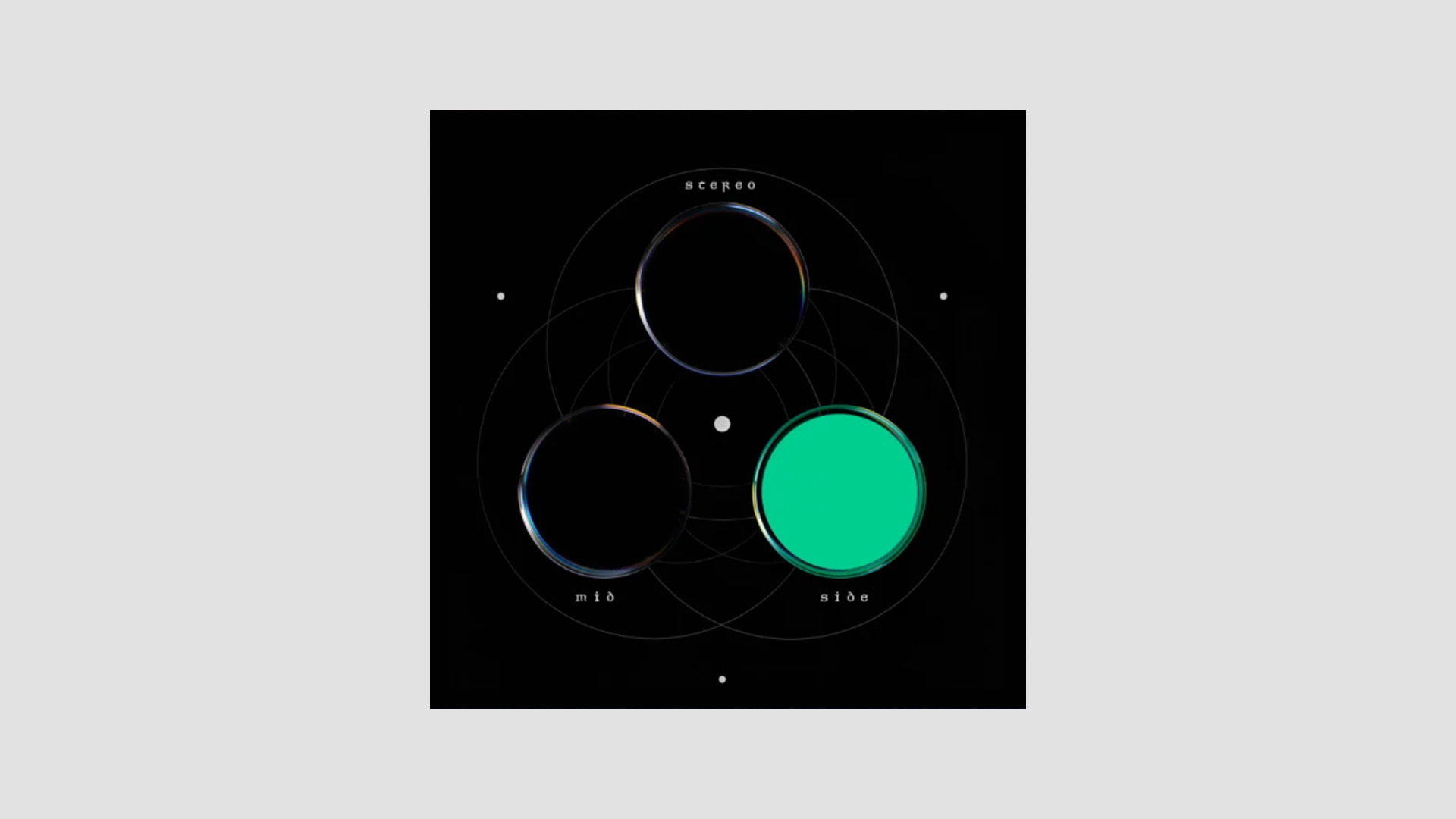
    Dead Robot has released DR Solo v1, a free utility plugin for monitoring stereo, mid, and side channels. It is available for Windows and macOS in VST2, VST3, and AU formats.

    A Simple Tool for Mid and Side Checking

    DR Solo v1 is a plugin built for one specific job: making mid and side monitoring easier. It uses a simple 3-button layout for switching between stereo, mid, and side channel listening modes.

    That may sound basic, but tools like this can be genuinely useful on a master bus, especially when checking mix balance, stereo width, and mono information. It can also help when referencing other tracks and trying to hear how their center and side content are distributed.

    Side Monitoring With a Practical Twist

    One detail that stands out is the option to play the side channel back in mono, which makes isolated side information easier to judge, since hard-panned side content can otherwise sound a bit strange or distracting when monitored on its own.

    As a result, DR Solo v1 looks like a small but practical utility for engineers and producers who want a quicker way to inspect stereo information without setting up a more complex routing chain.

    Features

    • Free mid and side monitoring plugin
    • 3-button interface for stereo, mid, and side soloing
    • Side channel can be monitored in mono
    • Useful for master bus checking and reference listening
    • Also useful for creative channel isolation

    Plugin Formats

    DR Solo v1 is available in VST3 and VST2 formats for Windows and macOS, plus AU for macOS. It requires macOS 10.13 or later and Windows 10 or later.

    Free Download

    DR Solo v1 is available as a free download from Dead Robot’s Gumroad.

  • Overload Audio Releases MOODYSIX Free 6-Voice Poly Analog Synth Plugin

    Overload Audio Releases MOODYSIX Free 6-Voice Poly Analog Synth Plugin

    Overload Audio has released MOODYSIX, a free 6-voice polyphonic synthesizer inspired by the 1981 Korg Polysix. It is available as a VST3 plugin for Windows and as VST3 and AU for macOS.

    A Polysix-Style Synth With the Original Character Intact

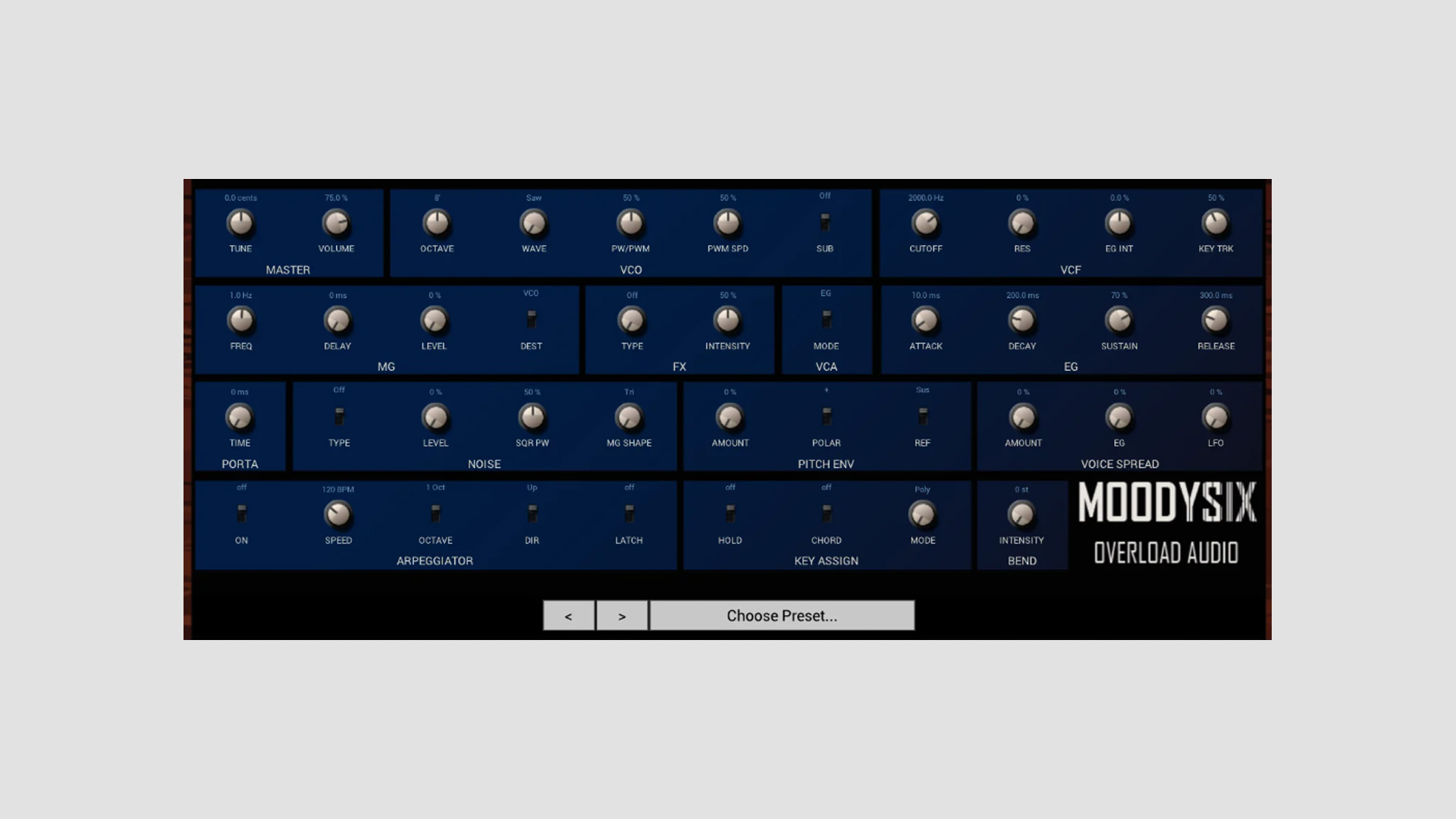
    MOODYSIX is modeled on the classic Polysix design, so it keeps the core layout simple and focused. Each voice includes one oscillator with saw, pulse width, and PWM waveforms, along with a sub oscillator and an SSM2044-style 4-pole lowpass filter.

    Overload Audio also keeps some of the original limitations in place. The synth stays strictly 6-voice and does not respond to velocity, which may not suit every workflow, but it does make sense if the goal is to stay closer to the character of the original hardware.

    Three Classic Mod Expansions

    What makes MOODYSIX more than a straight clone is the addition of three well-known Polysix hardware mods. NoisySix adds white and pink noise generators, plus an expanded LFO with extra waveform options. Polysex adds pitch envelope modulation and voice spread controls for thicker and more detuned sounds. ModyPoly brings proper portamento and glide across all voice modes.

    That combination gives the synth a wider range than a strict vintage emulation. So while the base sound stays rooted in Polysix territory, there is more room for movement, instability, and bigger layered textures.

    Filters, Effects, and Performance

    The synth includes a 4-pole lowpass filter with resonance, bipolar envelope intensity, and key tracking. It also offers an ADSR envelope for filter and amplitude shaping, along with extra envelope and LFO routing for pitch spread.

    One of the bigger attractions here is the effects section. MOODYSIX includes chorus, phaser, and ensemble effects modeled in a triple BBD style, which should appeal to anyone chasing that soft, animated analog texture these synths are known for.

    There is also an arpeggiator with several playback modes, octave ranges, and latch, plus hold and chord memory functions for easier performance and sketching.

    Features

    • Free 6-voice polyphonic synthesizer from Overload Audio
    • Inspired by the 1981 Korg Polysix
    • Saw, pulse width, and PWM waveforms
    • Sub oscillator with 1 or 2 octave options
    • SSM2044-style 4-pole lowpass filter
    • NoisySix, Polysex, and ModyPoly mod expansions
    • Extended LFO and noise options
    • Pitch envelope modulation and voice spread controls
    • Portamento across all voice modes
    • Chorus, phaser, and ensemble effects
    • Arpeggiator with latch and octave range options
    • Hold and chord memory
    • 32 factory presets

    Plugin Formats

    MOODYSIX is available in VST3 format for Windows and in VST3 and AU formats for macOS. According to Overload Audio, version 1.1 adds Intel Mac support and fixes the pink background issue.

    Free Download

    MOODYSIX is available as a free download from the Overload Audio Gumroad page.

  • 091Audio Releases 091HPDoctor Free Low-Frequency Filter Plugin

    091Audio Releases 091HPDoctor Free Low-Frequency Filter Plugin

    091Audio has released 091HPDoctor, a utility plugin focused on precise low-frequency processing. At first glance, it may look like a niche tool, but it targets the kind of detailed cleanup and shaping work that standard high-pass filters often do not handle well.

    A High-Pass Filter That Reaches Down to 1 Hz

    Most high-pass filters stop at 20 Hz, but HPDoctor goes down to 1 Hz. That alone makes it more useful than usual for jobs like DC offset removal, subsonic cleanup, and very controlled low-end shaping.

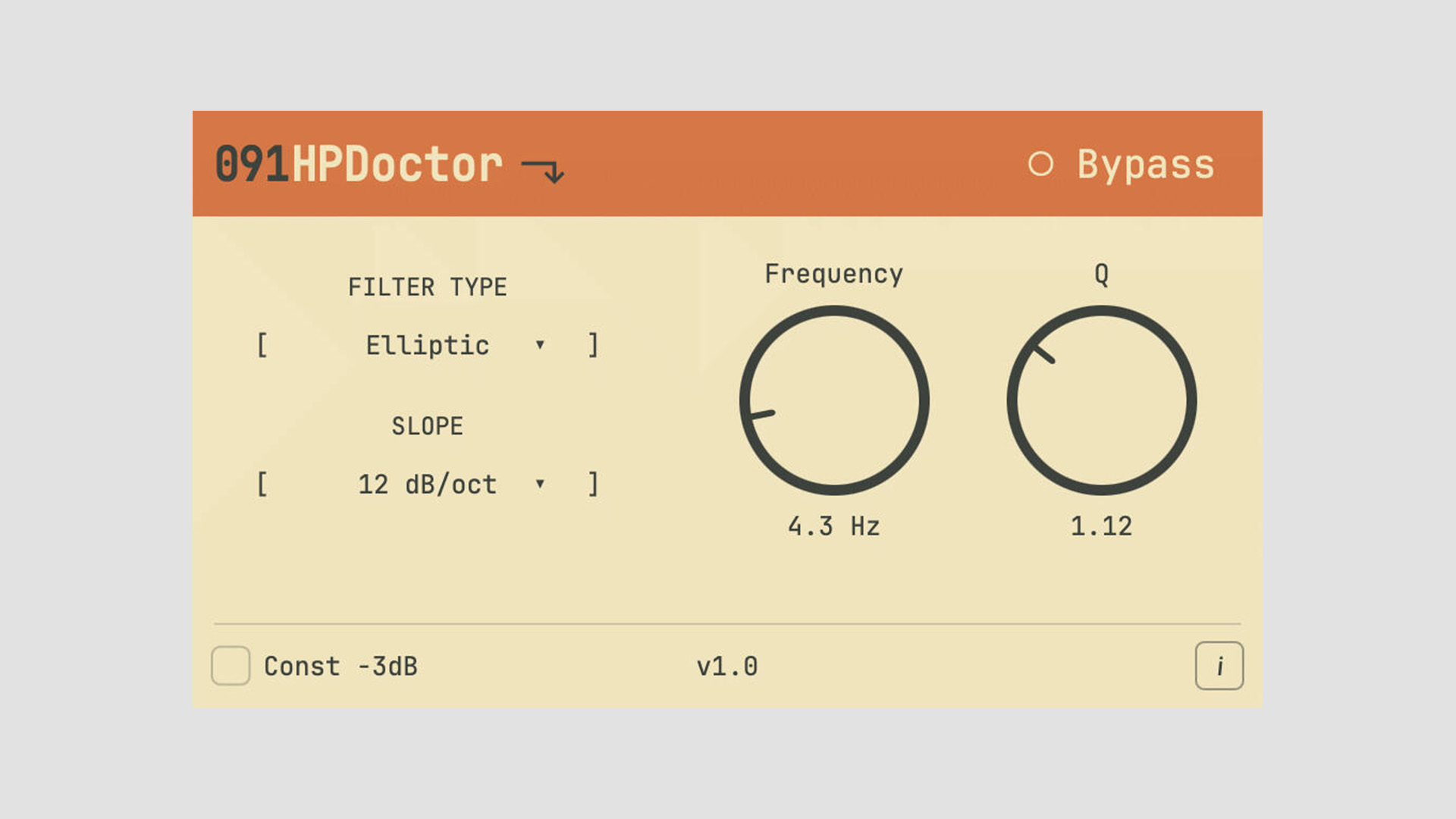
    The plugin covers frequencies from 1 to 150 Hz and offers slopes from 1 to 24 dB per octave, depending on the selected filter type. In practice, that gives users much more room to make careful moves instead of forcing broad or overly steep cuts.

    Seven Filter Types With Different Behavior

    091HPDoctor includes seven filter types: Butterworth, Elliptic, Chebyshev I, Chebyshev II, Bessel, Ladder, and Allpass. That is a strong range for a utility plugin like this, especially because the differences are not just technical on paper. They can matter when phase behavior and low-end feel are important.

    An optional -3 dB Const mode is also included, which helps keep cutoff behavior more consistent across the available filter types.

    Built for Practical Mixing and Mastering Jobs

    091Audio presents HPDoctor as a focused utility, and that seems fair. It is meant for specific tasks rather than broad tone shaping. Those tasks include removing DC offset without touching too much audible bass, cleaning subsonic energy before compression, shaping kicks and bass with resonance around the cutoff, and handling mastering cleanup where more precision is needed.

    The allpass mode also opens the door to phase alignment work, giving the plugin a bit more depth than a basic corrective filter.

    Features

    • Low-frequency processing ranges from 1 Hz to 150 Hz
    • Slopes from 1 dB/oct to 24 dB/oct
    • Seven filter types
    • Butterworth, Elliptic, Chebyshev I, Chebyshev II, Bessel, Ladder, and Allpass modes
    • Optional Const -3 dB mode
    • Full 64-bit double-precision internal processing
    • Click-free transitions for parameter and filter changes
    • Suitable for DC offset removal, subsonic cleanup, and phase work

    Plugin Formats

    The plugin is available in VST3 and AU formats for Windows, macOS, and Linux. The macOS version is signed.

    Free Download

    091HPDoctor is available now as a free download from the 091Audio website.